Prima Arquitectura Cash control
Prima is an architecture firm. It kept its cash book in an Excel file that worked for two years, until the card totals stopped adding up. We moved it to an app where every transaction shows who pays, who receives and how much.
- INDUSTRY
- Architecture
- WHAT WE DID
- App for income, expenses and accounts
- WHEN
- November 2026
- STATUS
- First version, live

Where they started
Prima kept its cash book in an Excel file with one row per account: money coming in with a plus sign and money going out with a minus. Moving money from one account to another took two rows, one in each.
It worked for two years. Then the cash still balanced, but the cards didn't, and going through the file row by row didn't show where the difference was. In a file like that, a flipped sign or a transfer recorded only halfway moves the balance without anyone noticing.
How we approached it
- We reviewedTheir whole Excel file: every account, every project, every transfer and how each balance was calculated.
- We mappedHow their money moves: payments from each project, the firm's expenses and what goes from one account to another.
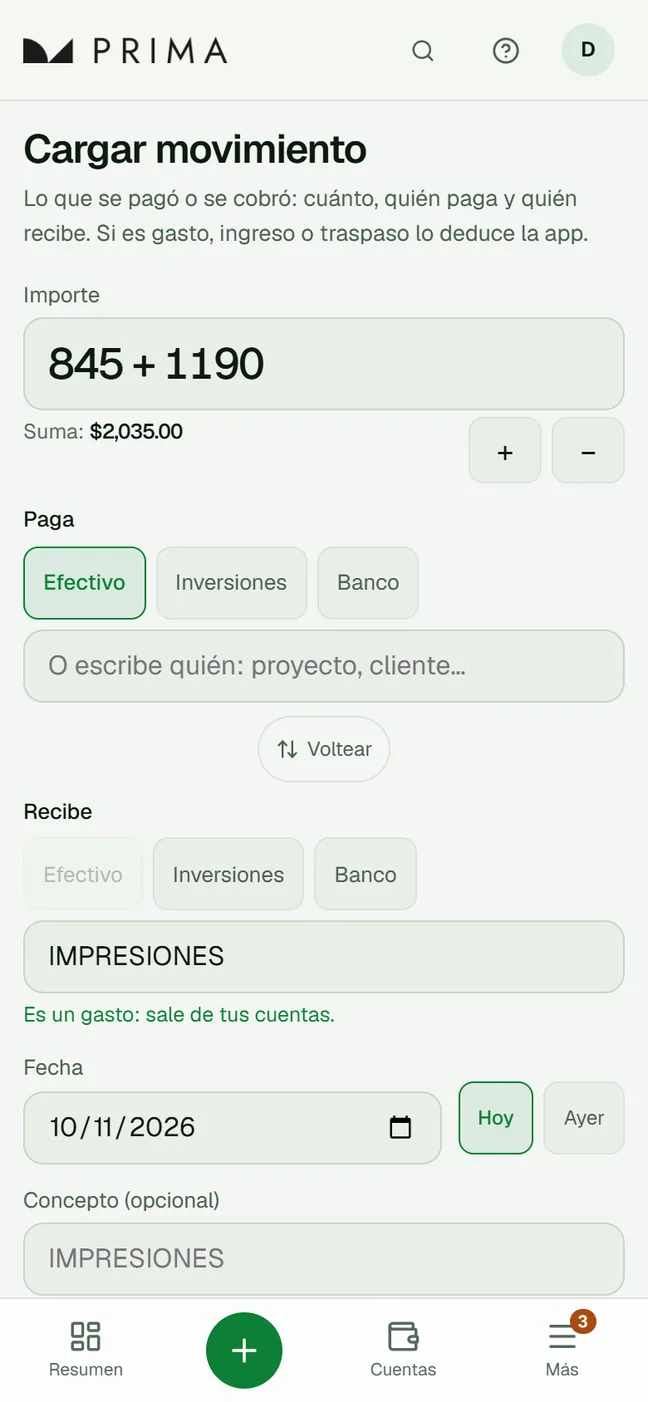
- We recommendedLeaving the Excel file behind and recording each transaction once, with no signs: who pays, who receives and how much. The app works out whether it's an expense, a payment or a transfer.
- We builtThe app, with their history already loaded and checked against the Excel file, a manual and a phone version.
What we built
An app for the firm's cash
Every payment in or out is recorded on a single screen, from the phone too: how much, who pays and who receives. Before saving, the app says whether it's an expense, a payment or a transfer, and what the account balance will be.
- Summary · money in the accounts, what is still to be collected and average spending
- Accounts · each one month by month, ready to compare with the bank statement
- Projects · what has been collected and what is left, calculated from the transactions
- Income and expenses · by year, month, concept and who paid
- Search · by concept, project or amount
- History and Undo · who changed what, with an automatic copy every day
- Manual with help on every screen
What's worth checking
The app doesn't fix anything on its own. It flags what is worth comparing with the bank statement, such as a charge that looks duplicated, a row with no amount or a transfer missing one side, and suggests what to do. A person makes every change, and every change can be undone.
When you enter the balance the bank shows, it works out the difference and points to the rows that could explain it: one worth exactly that amount, one flipped, swapped digits or a date close to the cutoff.

By the numbers
- 390 → 348rows in the Excel file that became transactions: each transfer took two rows and now takes one
- 5accounts with the same balance as in the Excel file, to the cent, on every date
- 7different warnings about what is worth checking
- 20topics in the manual, with search
Figures taken from the project documentation, November 2026.
What's next
Comparing each card with its bank statement to find where the difference is.
Got a similar process?
Tell us how you track it today and we'll tell you where to start.